
Making 2D and 3D Maps in Surfer 8
 Surfer 8, produced by Golden Software, is software that can be used for drawing 2D and 3D contour maps and block diagrams, calculating the area and volume of a desired region, drawing cross-section lines and detail area creation operations. This program is generally used by mining engineers to show ore deposits on the terrain and to create 3D terrain models; I learned it myself to introduce it to my friends in our photogrammetry course and to help a friend studying mining engineering prepare their project. The program is very simple to use and just as easy to understand. First of all, for data to be drawn in 3D in Surfer, you need 3D data called X, Y, Z (for example, 1st column LATITUDE, 2nd column LONGITUDE, 3rd column HEIGHT). Also, to prepare contour diagrams and 3D surface maps, the x, y, z coordinates we collected in the field are first entered into columns A, B and C in Microsoft Excel. Then the Surfer program is opened (Figure 1).

Figure-1
•1 Follow the Grid – Data menus.
•2 Select the database file we prepared in Microsoft Excel.
•3 In the menu that opens, select which coordinates in the program the columns of our database file in Microsoft Excel correspond to.
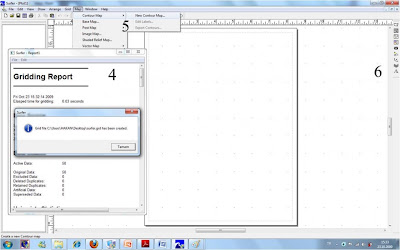
Figure-2
•4. The program performs calculations on the database; then confirm by clicking “OK”.
•5. Following the Contour Map – New Contour Map… menus (Figure 2), our contour map is generated in the program.
•6. Pressing the “3D Surface” button in the menus on the right-hand side of the program generates the 3D surface map.
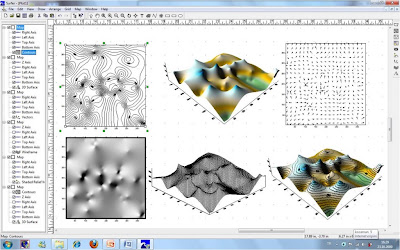
Figure-3 Examples of maps made with the Surfer program.
In addition, friends who wish can get the sample project video tutorial and the training document for the Surfer 8 program from the links below.
https://www.dropbox.com/s/h10coj0wj8yd2d3/Surfer_8_Egitim_Dokumani.rar
Note dated 06.08.2011: Because of the behaviour of many users acting solely in their own interests, the video tutorials have been placed under password protection. Perhaps this way the fact of how valuable knowledge is will regain its importance.
Using Surfer 8 from Hakan KOCAMAN on Vimeo.
1 November 2009, KTÜ Trabzon
Posted: by Hakan KOCAMAN

Category: Articles, Computers, General, Software
Tags: 2D and 3D Maps, Contour Map, Golden Software, Surfer, Surfer 8